



M-Driver M980 – Support, Wiring Diagram & Commissioning
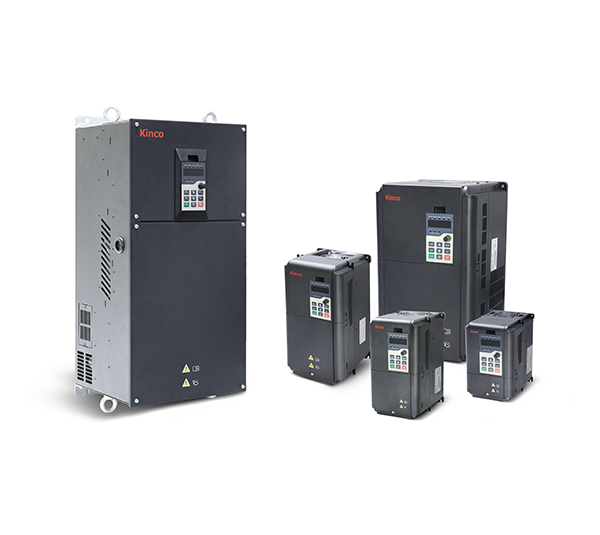
Everything for your M-Driver M980 after purchase – for all seven models from 2.2 to 15 kW, single-phase 230 V and three-phase 400 V, IP66:
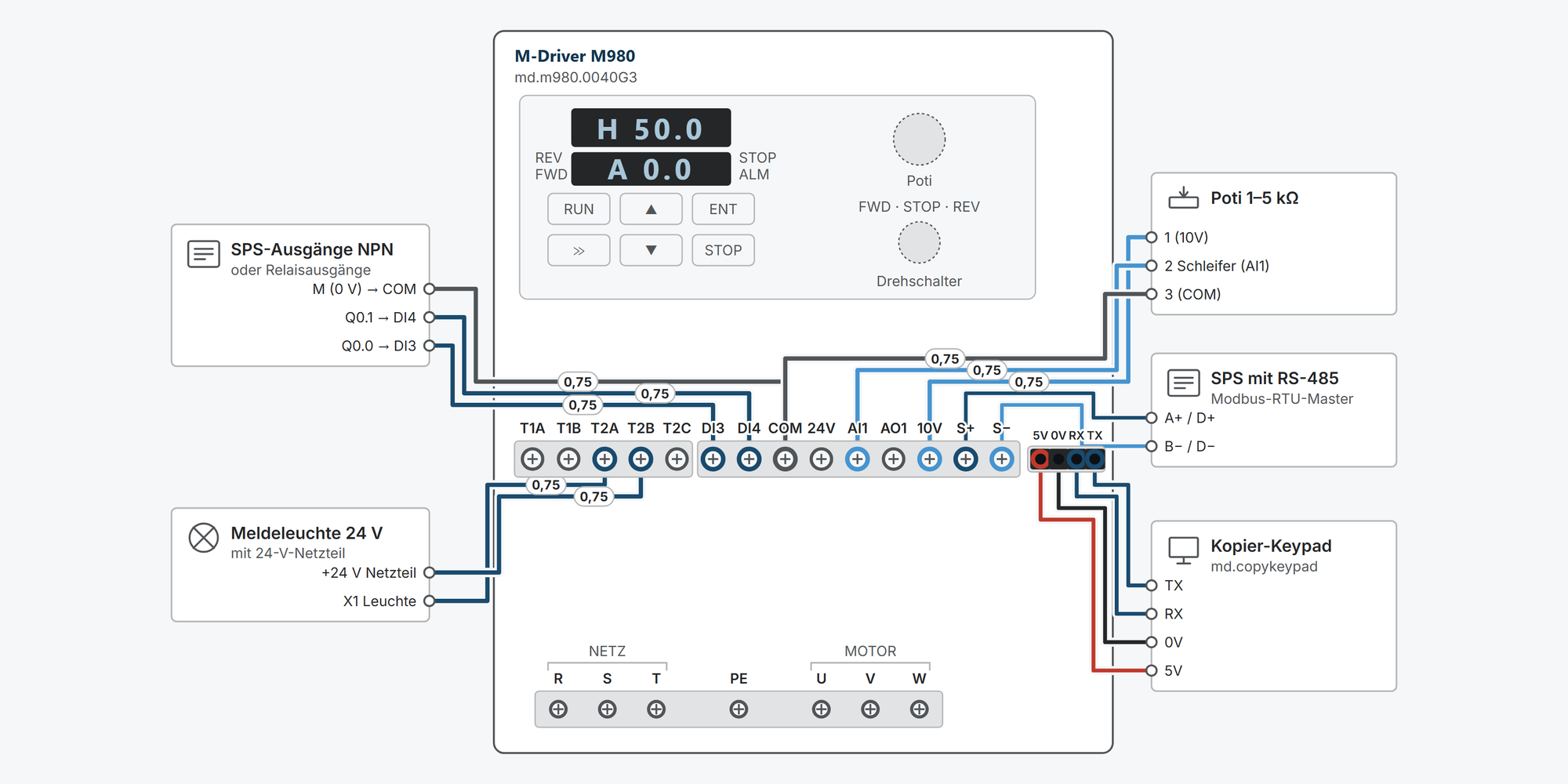
Interactive wiring diagram: mains and motor, start/stop, preset speeds, setpoint, Modbus RTU, fault relay and copy keypad, with cable cross-sections and parameters
First steps: commissioning in ten steps, from the motor data to the first run
Operation: keypad simulator to try out, with exercises
Dimensions & mounting: dimensional drawing per model, drilling pattern, minimum clearances and a printable drilling template
Downloads: user manual and CE certificate
Free support from spstiger if you get stuck
Keypad: keys, display and LEDs
ENT 3 s opens the menu for setting parameters – the most important key for programming. Try out the keypad here: set parameters, start and stop the motor, reset faults. The exercises guide you step by step through the most important procedures. Rest the mouse pointer on a key for a moment to see what it does right now.
Interactive wiring diagram
Tap a terminal or wire in the drawing to see details.
Terminal overview M980
| Terminal | Group | mm² | Function |
|---|---|---|---|
| T1A | RELAIS | 0.2–1.5* | Relay 1, NO contact T1A–T1B. Rating 250 V AC / 3 A, 30 V DC / 1 A. Function via F1-08 (factory 1 = inverter running). |
| T1B | RELAIS | 0.2–1.5* | Relay 1, second terminal of the NO contact. |
| T2A | RELAIS | 0.2–1.5* | Relay 2: T2A–T2B closes, T2B–T2C opens. Rating 250 V AC / 3 A, 30 V DC / 1 A. Function via F1-09 (factory 2 = fault). |
| T2B | RELAIS | 0.2–1.5* | Common terminal of relay 2. |
| T2C | RELAIS | 0.2–1.5* | NC contact of relay 2 (T2B–T2C). |
| DI3 | STEUER | 0.2–1.5* | Optocoupler input. Manual wiring diagram: contact between DI3 and COM. Function via F1-02 (factory 8 = preset speed terminal 1). |
| DI4 | STEUER | 0.2–1.5* | Optocoupler input, contact between DI4 and COM. Function via F1-03 (factory 9 = preset speed terminal 2). |
| COM | STEUER | 0.2–1.5* | Reference for DI3/DI4, AI1, AO1 and 10V (manual wiring diagram). The manual sometimes says GND; on the terminal strip the terminal is labeled COM. |
| 24V | STEUER | 0.2–1.5* | 24 V output of the inverter. Load capacity not stated in the manual. |
| AI1 | STEUER | 0.2–1.5* | 0–10 V, 0–20 mA or 4–20 mA, set via F0-07 (ones digit; 0 = 0–10 V, factory). Reference COM. |
| AO1 | STEUER | 0.2–1.5* | Function via F1-28 (factory 0 = output frequency), signal type via F0-07 (hundreds digit). Reference COM. |
| 10V | STEUER | 0.2–1.5* | +10 V for a setpoint potentiometer, max. 10 mA. Potentiometer 1–5 kΩ according to the terminal table (the wiring diagram states 2–10 kΩ). |
| S+ | STEUER | 0.2–1.5* | RS-485 positive (A+ / D+), Modbus RTU. Use a twisted, shielded pair. |
| S− | STEUER | 0.2–1.5* | RS-485 negative (B− / D−). |
| 5V | KEYPAD | – | Four-pin socket 5V, 0V, RX, TX to the right of S− for the copy keypad (manual chap. 3.2.3). The keypad is plugged in directly with the supplied ribbon cable. |
| 0V | KEYPAD | – | Reference of the keypad socket. |
| RX | KEYPAD | – | Data line to the copy keypad. |
| TX | KEYPAD | – | Data line to the copy keypad. |
| R / R (L) | LEISTUNG | – | Mains supply. Three-phase models: R, S, T (any phase sequence). Single-phase models: L to R, N to S. |
| S / S (N) | LEISTUNG | – | Mains supply; neutral conductor on single-phase models. |
| T / – | LEISTUNG | – | Third phase; unused on single-phase models. |
| PE | LEISTUNG | – | Protective earth for mains and motor. Must be able to carry the largest fault current until the line protection trips. |
| U | LEISTUNG | – | Motor output. No capacitors or surge arresters at the output; do not switch a contactor during operation. |
| V | LEISTUNG | – | Motor output. |
| W | LEISTUNG | – | Motor output. For motor cables of 100 m or more, fit an output reactor (manual). |
| DI1/DI2 | – | – | F1-00 (DI1) and F1-01 (DI2) exist in the menu, but the terminal strip only has DI3 and DI4. For start/stop via terminals, change F1-02/F1-03 instead. |
* Clamping range not stated in the manual, derived.
First steps with the M-Driver M980
Ten steps from unboxing to the first motor run: connect, get to know the keypad, enter motor data, set start/stop and setpoint, adjust ramps. You only need preset speeds, relays and Modbus if your application uses them.
Disconnect all supplies and wait at least 10 minutes (manual chap. 1.1). Only then open the cover and touch the terminals.
Always connect the protective earth (PE) first. Never apply mains voltage to U, V, W.
IP66 only applies with firmly tightened cable glands and sealed unused openings. Clearance at least 10 mm at the sides and at least 200 mm above and below.
1Connect mains and motorRequired
Mains to R, S, T (any phase sequence), single-phase models to R and S. Motor to U, V, W, PE on the mains and motor side.
The wiring diagram shows the cross-sections and circuit breaker for your model. The manual gives values up to 7.5 kW; for 11 and 15 kW they are derived and marked as such there.
Connect the motor correctly
Inverter Motor rating plate Connection single-phase 230 V (output 3~ 230 V) 230/400 V Delta three-phase 400 V 400/690 V Delta three-phase 400 V 230/400 V Star The manual recommends shielded motor cable; from 100 m cable length, an output reactor is required.
Do not start and stop the inverter via a mains contactor – the manual requires at least one hour between two switching operations. Use the keypad, terminals or Modbus for start and stop.
Wrong rotation direction: F0-14 = 1 or swap two motor phases.
Source: manual chap. 3.2.1–3.2.2, m980/01-basis
2Keypad: changing parametersRequired
The upper display shows the frequency (H), the lower one shows the current at the factory (A, adjustable with F6-02). During operation, ≫ scrolls through frequency, speed, voltage, current and power.
The rotary switch FWD · STOP · REV selects the main direction and stops the inverter in STOP. It cannot start the drive – use RUN for that. The manual does not describe the switch; this is how it behaved in the spstiger test.
Parameter Value Meaning F0-24 1 Reset all parameters to factory settings (only when stopped) F0-25 2 Menu shows only changed parameters (factory 1 = all) F6-01 0 Parameter lock off (factory); 1 = locked How to change a parameter
Hold ENT for 3 seconds: the display switches to the group level (F0).
Select the group with ▲/▼, e.g. F8. Press ENT briefly.
Select the parameter with ▲/▼, e.g. F8-02. ENT briefly shows the value.
Change the value with ▲/▼; ≫ moves to the next digit.
ENT briefly saves. ENT for 3 seconds goes back without saving and leads from the group level to the operating display.
You find the display values of group U0 at the group level – e.g. U0-08 DC link voltage, U0-11 state of the digital inputs.
The procedure in the manual (chap. 4.3) is brief. This sequence follows the figure there.
Transfer parameters to other M980 units: with the copy keypad on the 5V/0V/RX/TX socket to the right of S−.
Show wiring “Copy parameters (keypad)”
Practise on the keypad: “Set a fixed setpoint of 30 Hz”Practise on the keypad: “Select the direction with the rotary switch”Practise on the keypad: “Adjust the setpoint with ▲/▼ during operation”Practise on the keypad: “Switch the lower display to speed”
Source: manual chap. 4, m980/01-basis, 05-funktionen
3Enter motor dataRequired
The values are on the motor's rating plate. The parameters of group F8 can only be changed when stopped.
Parameter Value Meaning F8-00 Rating plate Rated power in kW F8-01 Rating plate Rated voltage in V F8-02 Rating plate Rated current in A – basis for motor protection F8-03 Rating plate Rated frequency, in Europe usually 50.0 Hz (factory) F8-04 Rating plate Rated speed in min⁻¹ (factory 1460) F8-06 0 / 1 / 2 Control mode: 0 = V/f (factory), 1 = vector control asynchronous motor, 2 = vector control synchronous motor Auto-tune the motor (required for vector control)
Enter F8-00 to F8-04 and set F8-06 to 1 or 2.
Select F8-07: 1 = static (motor stays connected to the load), 2 = dynamic (uncouple the motor from the load; it rotates during tuning).
The measurement determines resistances and inductances (F8-11 to F8-18).
The manual does not describe how to start the measurement. On comparable inverters it starts with RUN on the keypad (F0-00 = 0) – expect the motor to start turning.
Auto-tune again after a reset to factory settings or new motor data (manual). No measurement is needed for V/f operation (F8-06 = 0).
Practise on the keypad: “Enter motor rated current F8-02”
Source: manual chap. 5.2.9, m980/04-regelung
4Set the start/stop sourceRequired
F0-00 determines where the start command comes from. The terminal strip only has DI3 and DI4; the manual shows one contact each between DIx and COM.
Parameter Value Meaning F0-00 0 / 1 / 2 0 = keypad RUN/STOP (factory), 1 = terminals, 2 = Modbus F1-02 1 DI3 = forward (factory 8 = preset speed terminal 1) F1-03 2 DI4 = reverse (factory 9 = preset speed terminal 2) F1-06 0 Two-wire mode 1 (factory); 2/3 = three-wire mode F0-20 1 STOP key works in every operating mode (factory) With F0-00 = 1, DI1/DI2 start the drive at the factory. These inputs only exist in the menu, not on the terminal strip – so change F1-02/F1-03.
The manual only describes contacts to COM. For PLCs with PNP outputs, use interface relays.
Show wiring “Start/stop via switch”Show wiring “Start/stop from PLC (NPN)”
Practise on the keypad: “Start the motor with RUN and the pot”Practise on the keypad: “Set start via terminals DI3/DI4”
Source: manual chap. 3.2.3–3.2.4, 5.2.1, m980/01-basis, 02-io
5Set the setpointRequired
At the factory, the setpoint comes from the pot on the front (F0-01 = 1).
Parameter Value Meaning F0-01 0 / 1 / 2 / 4 / 8 0 = F0-16, 1 = pot on the front (factory), 2 = AI1, 4 = preset speeds, 8 = Modbus (only when stopped) F0-16 50.0 Hz Frequency setting with F0-01 = 0; adjustable with ▲/▼ during operation (factory) F0-07 0000 / 0002 AI1 signal (ones digit): 0 = 0–10 V (factory), 1 = 0–20 mA, 2 = 4–20 mA; hundreds digit = AO1 F0-09 50.0 Hz Upper frequency limit = 100 % setpoint (factory) F0-10 0.0 Hz Lower frequency limit (factory) The manual does not mention a selector switch for AI1 – current or voltage is set by F0-07 alone.
External pot: 1–5 kΩ on 10V, AI1 and COM; terminal 10V supplies max. 10 mA.
Show wiring “Setpoint via potentiometer”Show wiring “Setpoint 4–20 mA”
Source: manual chap. 3.2.3, 5.2.1, m980/01-basis
6Set acceleration and deceleration timeRequired
Parameter Value Meaning F0-04 model-dependent Acceleration time from 0 Hz to F0-09 (0.0–500.0 s) F0-05 model-dependent Deceleration time from F0-09 to 0 Hz F0-08 0 Stop: 0 = ramp (factory), 1 = coast F3-08 0 Ramp shape: 0 = linear (factory), 1 = S-curve (portions F3-09/F3-10) The M980 has no terminals for a brake chopper or braking resistor. With a large flywheel mass, a deceleration time that is too short leads to Err06 (overvoltage during deceleration) – then extend F0-05 or select F0-08 = 1 (coast).
An acceleration time that is too short leads to Err02 (overcurrent during acceleration).
Practise on the keypad: “Set acceleration time F0-04 to 5.0 s”
Source: manual chap. 3.2.1, 5.2.1, 5.2.4, 7.2, m980/01-basis
7Preset speeds via DI3/DI4Optional
At the factory, DI3 and DI4 are preset speed terminals 1 and 2. With F0-01 = 4, two switches select four frequencies; start with RUN on the keypad.
Steps
DI4 (terminal 2) DI3 (terminal 1) Step Parameter OFF OFF 0 F4-01 (factory 0.0 Hz) OFF ON 1 F4-02 ON OFF 2 F4-03 ON ON 3 F4-04 Values from −F0-09 to +F0-09; a negative value reverses the rotation direction.
F4-00 = 2 makes the pot on the front step 0. Eight steps (F4-01 to F4-08) would need a third input, which the terminal strip does not have.
Show wiring “Preset speeds via switches”
Source: manual chap. 5.2.5, m980/05-funktionen, 02-io
8Assign relays and analog outputOptional
Factory defaults
Terminal Parameter Factory Meaning T1A–T1B (NO) F1-08 1 Inverter running T2A–T2B / T2B–T2C F1-09 2 Fault AO1 F1-28 0 Output frequency Further relay functions: 3 = ready, 7 = switched via Modbus (register 0x0003), 11/12 = frequency 1/2 reached.
Contacts 250 V AC / 3 A or 30 V DC / 1 A.
Show wiring “Fault signal via relay”
Source: manual chap. 3.2.3, 5.2.2, m980/02-io
9Configure Modbus RTUOptional
RS-485 to S+ and S−. To control via the bus you need both: command source and frequency source set to communication.
Parameter Value Meaning F0-00 2 Command source = communication F0-01 8 Frequency source = communication (only when stopped) F7-00 1 Slave address 1–249 (factory 1) F7-01 0 Baud rate: 0 = 9600 (factory), 1 = 19200, 2 = 38400, 3 = 57600, 4 = 115200 F7-02 3 Data format: 3 = 8-N-1 (factory), 0 = 8-N-2, 1 = 8-E-1, 2 = 8-O-1 F7-03 0.0 s Timeout off (factory); otherwise Err16 if telegrams stop arriving Important registers (function code 03 read, 06 write)
Register Content Values 0x0001 Frequency setpoint −10000 … 10000 ≙ −100 … 100 % of F0-09; 5000 = 25.0 Hz at 50.0 Hz (calculated) 0x0002 Control command 1 = forward, 2 = reverse, 5 = coast to stop, 6 = ramp to stop, 7 = fault reset 0x0003 Relays Bit 0 = relay 1, bit 1 = relay 2 (with F1-08/F1-09 = 7) 0xF000 … Parameter 0xFGPP: G = group, PP = number in hexadecimal, e.g. F7-01 → 0xF701, F0-16 → 0xF010 0x1000 … Display values U0 0x1000 status (1 = forward, 2 = reverse, 3 = stop), 0x1001 fault code, 0x1003 frequency (0.1 Hz), 0x1006 current (0.1 A) Read at most 12 consecutive registers; always write only one register (function code 06).
Terminate the bus ends with 120 Ω; the manual does not describe a built-in termination resistor.
Show wiring “Modbus RTU to PLC”
Source: manual chap. 6, m980/03-modbus, 06-monitor
10First run and faultsRequired
Common faults
Display Meaning Remedy Err02 Overcurrent while accelerating Extend acceleration time F0-04, check motor data and cables Err06 Overvoltage while decelerating Extend deceleration time F0-05 or use coast to stop Err09 Undervoltage Check mains voltage Err11 Motor overload Check load and rated current F8-02 Err12 / Err13 Phase loss input / output Check mains or motor cable Err14 Module overtemperature Check environment, fan and clearances; reduce carrier frequency F0-13 Err16 Communication timeout Check bus cable and F7 parameters Err23 Earth fault Check motor and motor cable with an insulation tester (disconnect the inverter) Reset with STOP on the keypad or Modbus register 0x0002 = 7.
The last three faults with frequency, current and DC link voltage are stored in U0-51 to U0-71.
Practise on the keypad: “Reset a fault and find it in the fault memory”
Source: manual chap. 7.2–7.3, m980/01-basis, 06-monitor
Revision 2.0 · 26.09.2026 · Source: 980 Series High Protection Inverter User Manual (Feb. 2025), prepared in spstiger vfd-konfig (m980/01-basis, 02-io, 03-modbus, 04-regelung, 05-funktionen, 06-monitor). The manufacturer manual and applicable standards take precedence; installation and commissioning by a qualified electrician only.
Dimensions and mounting
Dimensions and drilling pattern of the selected model. The drawing is schematic; the dimensions are taken from the manual.
All models
| Item | Rating | W × H × D (mm) | Hole spacing (mm) | Hole ⌀ (mm) | Weight (kg) |
|---|---|---|---|---|---|
| md.m980.0022G1 | 2.2 kW · 1~ 230 V | 127 × 255 × 155 | 113 × 222 | 5 | – |
| md.m980.0022G3 | 2.2 kW · 3~ 400 V | ||||
| md.m980.0040G3 | 4 kW · 3~ 400 V | ||||
| md.m980.0055G3 | 5.5 kW · 3~ 400 V | 155 × 286 × 174 | 138 × 249 | 5 | – |
| md.m980.0075G3 | 7.5 kW · 3~ 400 V | ||||
| md.m980.0110G3 | 11 kW · 3~ 400 V | 200 × 351 × 208 | 183 × 320 | 5 | – |
| md.m980.0150G3 | 15 kW · 3~ 400 V |
Mounting step by step
1Check the installation site
The M980 has a closed housing with cable glands. The manual still sets limits for the installation site.
Ambient temperature −10 to +40 °C. Above that derate by 1.5 % per kelvin, 50 °C maximum.
Humidity below 95 %, non-condensing.
Vibration below 5.9 m/s² (0.6 g).
Altitude up to 1000 m without derating; above that 1 % per 100 m.
No direct sunlight, not where water can drench the unit, away from flammable materials (manual chapters 2.5 and 3.1.1).
2Keep the minimum clearances
Heat is dissipated from bottom to top. That is why the M980 needs a lot of space above and below the housing but little at the sides.
At least 10 mm at the sides, also between two drives side by side.
At least 200 mm above and below.
3Mark and drill the holes
The M980 is fixed with four screws through the rear wall: two round holes at the top and two slots at the bottom that are open towards the edge (manual chapter 2.4). The holes are 5 mm in diameter; the manual gives no screw size, M4 fits (derived).
The 1:1 drilling template helps with marking out. Print it at actual size (100 %) and check the 100 mm reference length with a ruler.
4Mount vertically
Mount the drive vertically on a mounting rail or a flat surface with the cable glands at the bottom (manual chapter 3.1.1). Thanks to the open slots at the bottom, the lower screws can be fitted first and the unit set onto them.
5Several drives
Several M980 are best mounted side by side. If they sit one above the other, the lower unit heats the upper one; then fit an air baffle between them (manual chapter 3.1.2).
6Connect
Feed the cables through the three cable glands at the bottom and then tighten them. Cross-sections and fusing per model are shown in the wiring diagram.
Revision 1.0 · 29.09.2026 · Source: 980 Series User Manual (02/2025), chapters 2.3, 2.4 and 3.1. The manufacturer manual and applicable standards take precedence; installation by a qualified electrician only.
Stuck?
Our support helps you free of charge. Tell us what you are planning and which model you use – via the contact form, by email or in the community forum.
Contact formEmail support@spstiger.deAsk in the community forum
More ways to contact us: Support contacts
We have compiled and checked this page carefully from the manufacturer’s documentation. Even so, an error may have slipped in. The manufacturer’s manual and the applicable standards always take precedence. Spotted something? Let us know – we’ll be glad to fix it.
Downloads
User manual and CE certificate:
M-Driver M980 frequency inverters
Accessories
